People often ask "Arduino or Raspberry Pi, which is better?" — but that’s the wrong question. They’re different classes of tools: a microcontroller board vs a single‑board computer. The right question is: "What does my project actually need?"
Fundamental difference: microcontroller vs SBC
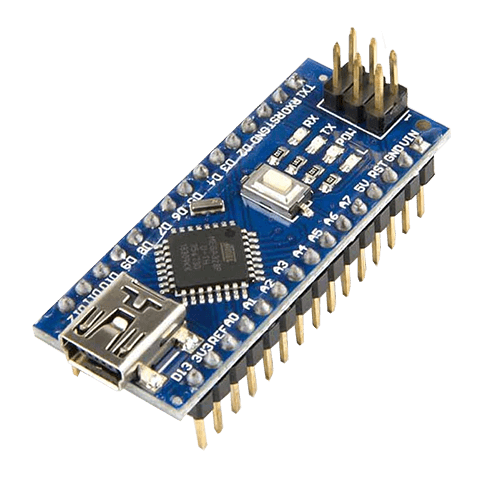
An Arduino Uno with its ATmega328P is a simple 8‑bit microcontroller. Your code runs directly on bare metal, with no operating system in between. That gives you low latency and highly predictable timing: when you digitalWrite() a pin, it changes almost immediately. EMBEDDEDMEDIAPLACEHOLDER204END
Arduino Uno SMD Edition microcontroller board. — Image: SparkFun Electronics from Boulder, USA / Wikimedia Commons, CC BY 2.0
A Raspberry Pi 4, by contrast, is a full single‑board computer (SBC) running Linux: multi‑core ARM CPU, gigabytes of RAM, a filesystem on microSD, USB, HDMI, Ethernet, Wi‑Fi, Bluetooth.
In plain language:
- Arduino is a "precise, low‑level controller"
- Raspberry Pi is a "smart, high‑level brain"
They overlap a bit, but each shines in a different role.
Spec comparison: what’s really inside?
Feature | Arduino Uno R3 | Raspberry Pi 4 Model B |
|---|---|---|
Core type | 8‑bit AVR MCU | 64‑bit ARM CPU (4 cores) |
Clock speed | 16 MHz | 1.5 GHz |
RAM | 2 KB SRAM | 2–8 GB LPDDR4 |
Program storage | 32 KB flash | microSD card (gigabytes) |
OS | None | Linux (Raspberry Pi OS, etc.) |
Digital I/O | 14 (6 PWM) | ~26 GPIO (model‑dependent) |
ADC | 6 channels, 10‑bit | None (needs external ADC) |
Typical power draw | ~50–70 mA | 600 mA and up |
Programming | Arduino IDE, C/C++ | Python, C/C++, Node.js, etc. |
This table already hints at the use cases: Arduino is tiny, deterministic and frugal; Raspberry Pi is heavy‑duty and feature‑rich.
When Arduino is the better fit
Choose Arduino when you need real‑time control and simplicity:
- Driving LEDs, relays, servos, stepper motors
- Reading sensors frequently (analog sensors, IMUs, ultrasonic rangefinders)
- Battery‑powered devices that must run for days or months
- Simple, safety‑critical logic (door locks, thermostats, watchdogs)
Key strengths:
- Deterministic timing — no multitasking OS to introduce jitter
- Very low power — sleep modes allow multi‑month battery life
- Robustness — no filesystem, no "SD card corrupted" surprises
If you’re just getting into electronics, Arduino also gives you a very direct feel for GPIO, timers, interrupts, and voltages.
When Raspberry Pi is the better fit
Choose Raspberry Pi when your project needs a full computer environment:
- Web dashboards, REST APIs, MQTT brokers
- Camera streaming, image processing, machine learning
- Local databases, logging, and data visualization
- HDMI display, touch UI, keyboards, USB peripherals
Strengths:
- Linux ecosystem —
ssh,git,docker, cron jobs, systemd services - Python and friends — huge library ecosystem via
pip - Networking — Ethernet, Wi‑Fi, Bluetooth ready out of the box
If your requirement includes phrases like "web interface", "save to database", "run Python ML model" or "connect to cloud", you’re squarely in Raspberry Pi territory.
Reliability and power considerations
For 24/7 embedded deployments, the trade‑offs matter.
Arduino:
- Draws tens of milliamps; easy to run from small batteries or solar
- Tolerates power cuts well — no OS or filesystem to corrupt
- Boots instantly; no 30‑second OS startup
Raspberry Pi:
- Eats far more power; you must budget for a solid 5V supply
- Sudden power loss can corrupt the SD card
- Needs clean shutdown for best reliability
For remote sensors in the field, Arduino (or similar MCUs) are usually the first choice. For a home server that sits near a wall outlet, Raspberry Pi is fine.
Development experience and learning value
Arduino side:
- Arduino IDE is extremely approachable
- The community has countless examples, libraries and shields
- Great to learn embedded C/C++, registers, and hardware basics
Raspberry Pi side:
- Teaches you Linux, shell, networking, system administration
- Lets you practice Python, web development, even Docker on real hardware
- One board can act as both development machine and runtime target
For a beginner who mainly wants to blink LEDs and understand electronics: start with Arduino. For someone interested in both hardware and general software engineering: Raspberry Pi adds huge long‑term value.
Best of both worlds: use them together
In many serious projects, the ideal architecture is not either/or but both:
- Arduino (or another MCU) handles low‑level, real‑time I/O
- Raspberry Pi runs Linux, networking, storage, and UI
You connect them via UART, I²C or USB:
- Arduino gathers sensor data, drives motors, reads encoders
- Raspberry Pi logs data, serves a web UI, and talks to the cloud
This pattern is common in robotics, home automation hubs, and lab equipment.
Concrete recommendations
Pick Arduino if:
- Your primary focus is learning electronics and embedded fundamentals
- The device must be ultra‑reliable and run from batteries for a long time
- You need precise timing and fast reaction to sensor changes
- Networking, graphics, and storage are minimal or not needed
Pick Raspberry Pi if:
- You need Linux, networking, Python libraries, or camera support
- Your project includes a web interface, database, or rich UI
- Power is available from the wall and boot time is not critical
If your budget allows, the most flexible setup in a maker lab is to have both an Arduino and a Raspberry Pi on hand. Then you can assign each project to the platform that fits it best — or combine them for maximum capability.